
I'm Learning a New Instrument
I used to carry my saxophone everywhere. My back doesn’t miss it, but I do miss having an instrument with me whenever I feel like playing. These days my laptop is always in my backpack, so I figured I’d try turning it into one.
I’m building a small synthesizer in C++ with Raylib, played entirely on the laptop keyboard. I’m mapping the layout of a chromatic button accordion onto QWERTY. It seems (and I’ve seen someone do it before) like a better fit for the keyboard, compared to mapping a piano.
If you’re not hip to the accordion, check this out. This is one of my favourite players, João Barradas, playing a Chopin étude:
I believe this accordion uses the same layout logic I tried in my app, but with five rows. I think some notes are repeated.
I remember trying an accordion when I was ten. I don’t think I managed to play even a C major scale. It’s a hard instrument.
Keyboard Layout
I did attempt to map some sort of piano layout, where the hand jumps between two halves of the keyboard. It’s not really the most comfortable, and honestly an accordion layout just sounds way cooler.
A chromatic button accordion forms some sort of a grid. Every button in a column is a minor third above the one before it, and neighbouring rows are one semitone apart.
 Q row:   Q    W    E    R    T    Y    U    I
          A3   C4   Eb4  Gb4  A4   C5   Eb5  Gb5

 A row:    A    S    D    F    G    H    J    K
           Ab3  B3   D4   F4   Ab4  B4   D5   F5

 Z row:      Z    X    C    V    B    N    M    ,
G3 Bb3 Db4 E4 G4 Bb4 Db5 E5- the slanted columns are chromatic:
Z A Qare all a semitone apart, thenX S W, thenC D Eand so forth continue the sequence - one key to the right is a minor third, four keys to the right is an octave
- shapes are easy to move: G major is
Z S D, and the same shape one key to the right,X D F, is Bb major
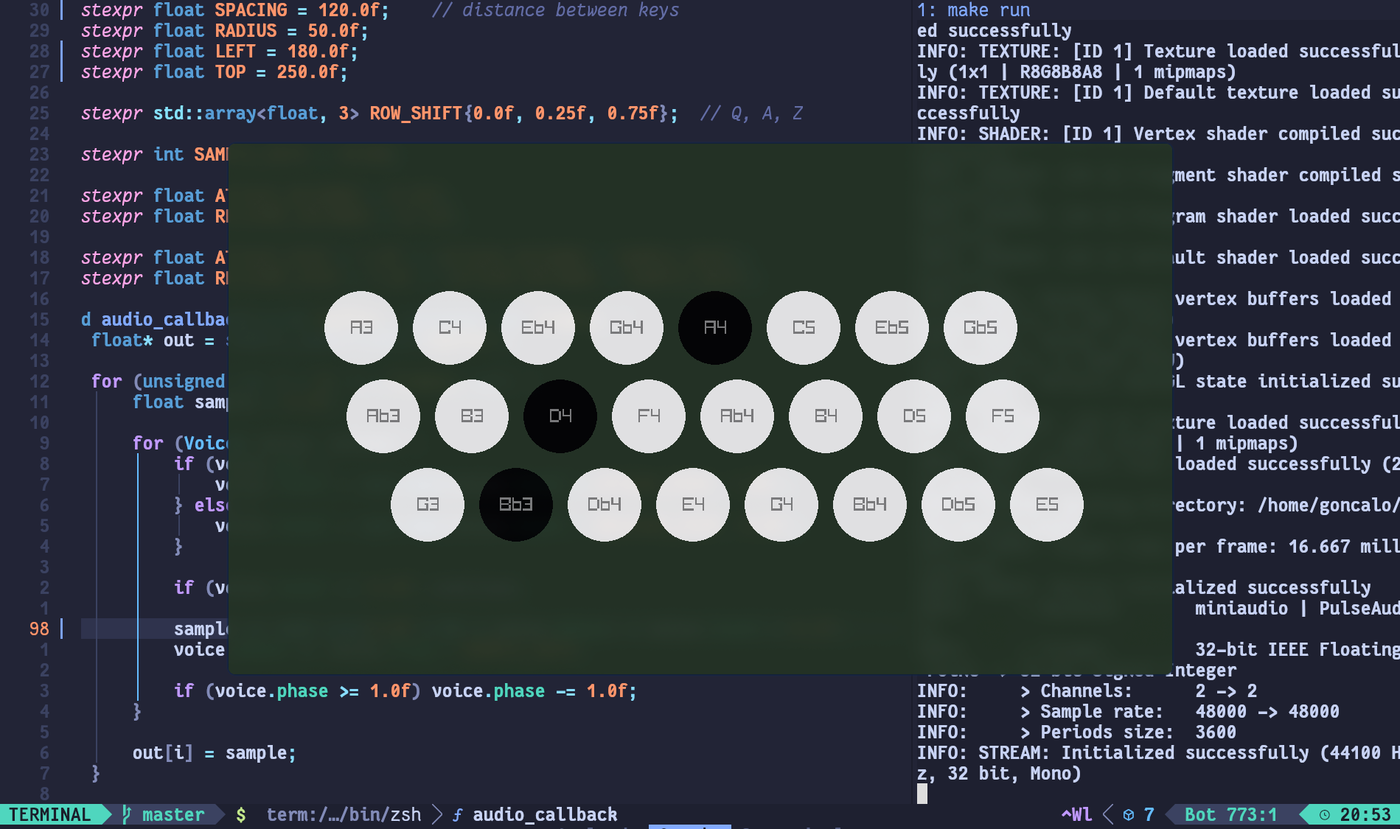
I get two full octaves. The downside is that it’s not a piano, which has the fingerings I’m familiar with. This process of learning new keybinds to play is starting to give me déjà vu of when I started to learn Vim motions to program. There was definitely a learning curve, but it was worth the effort, and it made my programming practice way more enjoyable and fun. Maybe I’ll get the same amount of enjoyment out of internalizing these keys into my system.
I made a simple interface where I could see the buttons with the note labels on them, and I made them signal when I press the keys.
To the Code and Beyond
Every key plays a note, and every note has a frequency that represents how many times per second its sound wave vibrates. A4 is 440 Hz, and each octave up doubles it.
Digital audio is a long list of numbers, called samples, that tell the speaker how to move. I set the sample rate to be at 44,100. Raylib keeps asking for the next batch of samples, and this function provides them:
void audio_callback(void* buffer, unsigned int frames) {
    float* out = static_cast<float*>(buffer);

    for (unsigned int i = 0; i < frames; ++i) {
        float sample = 0.0f;

        // add up the waves of every key that is held down
        for (Voice& voice : voices) {
            if (!voice.on) continue;

            sample += std::sin(2.0f * PI * voice.phase) * 0.3f;

            // move along the wave, faster for higher notes
            voice.phase += voice.freq / SAMPLE_RATE;
            if (voice.phase >= 1.0f) voice.phase -= 1.0f;
        }

        out[i] = sample;
    }
}
Each key has its own voice, which remembers its note’s frequency and where it is in its wave. A chord is just several waves added together.
Chords that refuse to play
I ran into this strange problem where some three-note chords work perfectly, while others don’t.
Unlike a piano, where each key has its own mechanism, a laptop keyboard uses a grid of shared electrical connections to detect which keys are pressed. It’s a way of reducing the number of wires needed.
The downside is that with some combinations of three keys, the keyboard can’t tell which ones are pressed, so it leaves one out. This is known as ghosting.
You can see it happen in the clip below. The fourth chord, A major (E, A and C#), refuses to sound properly when I press V, T and M together.
What’s next
I’ll try to get some more sounds, and effects, maybe implement a way to record and layer tracks, I could eventually turn this into a small DAW (digital audio workstation). I don’t know how far I’ll take it, but it sounds like a fun way to keep learning and making music at the same time. I’ll write about it here as I go.